Yahoo Mail sign-up options-
| Platform | Difficulty | Estimated Time | Key Requirements |
|---|---|---|---|
| Web Browser | Easy | 5-10 minutes | Internet connection, device, valid phone number or alternative email |
| Android | Easy | 5-10 minutes | Smartphone, Google Play Store, phone number |
| iPhone/iOS | Easy | 5-10 minutes | iPhone, App Store, phone number |
Why Choose Yahoo Mail?
Yahoo Mail remains a popular free email service in 2026 that offers:
- 20 GB of free storage
- Built-in spam protection
- Easy-to-use interface
- Integration with other Yahoo services
Method 1: Signing Up via Web Browser
Step-by-Step Process
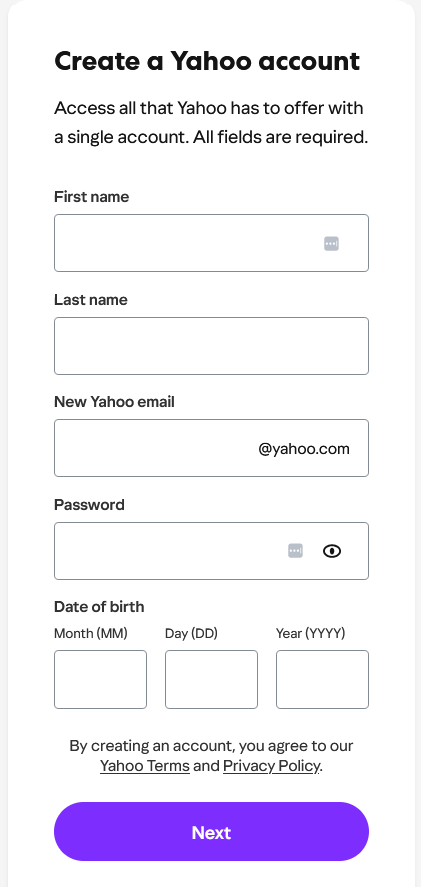
Open Yahoo Mail Website
- Navigate to mail.yahoo.com
- Click on “Create account” button
Enter Personal Information
- Choose a unique Yahoo email address
- Create a strong password (at least 8 characters, mix of letters, numbers, and symbols)
- Provide your:
- First and last name
- Birth date
Verify Your Account
- Complete the verification process
- Either verify via phone number or alternative email
- Solve any CAPTCHA challenges to prove you’re human
Method 2: Signing Up on Android
Installation Steps
- Open Google Play Store
- Search for “Yahoo Mail”
- Download and Install the official Yahoo Mail app
- Open the app and select “Create Account”
- Choose a unique Yahoo email address
- Create a strong password (at least 8 characters, mix of letters, numbers, and symbols)
- Provide your:
- First and last name
- Birth date
Method 3: Signing Up on iPhone
iOS Installation Process
- Open App Store
- Search for “Yahoo Mail”
- Download and Install the Yahoo Mail app
- Launch the app
- Tap “Create Account”
- Choose a unique Yahoo email address
- Create a strong password (at least 8 characters, mix of letters, numbers, and symbols)
- Provide your:
- First and last name
- Birth date
Common Signup Challenges and Solutions
| Problem | Solution |
|---|---|
| Email Already Taken | Try variations like adding numbers or using alternative email formats |
| Verification Issues | Double-check phone number or use alternative email verification |
| Password Requirements | Use a mix of uppercase, lowercase, numbers, and symbols |
Tips for Yahoo Mail Users
- Enable Two-Factor Authentication for extra security
- Regularly update your recovery options
- Use a unique, strong password
- Consider using a password manager
- Periodically check spam and security settings
Alternative Email Services to Consider
If Yahoo Mail doesn’t meet your needs, consider:
- Gmail: Google’s robust email service
- Outlook: Microsoft’s email platform
- ProtonMail: Privacy-focused encrypted email